ANIMATED GIF TOOL
GIF Background Remover
Upload an animated GIF and remove its background frame by frame — flat colors are keyed locally in your browser, complex scenes go through an AI cutout that runs on your device. You get a transparent GIF back, free, with no sign up and no watermark.
REAL EXAMPLE, REAL EXPORT
What a removed background actually looks like
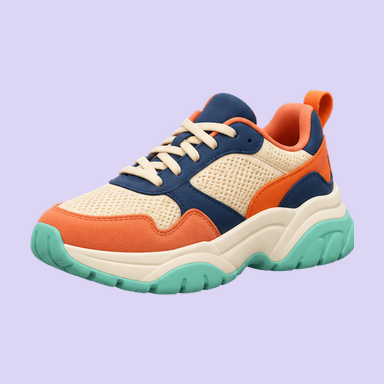
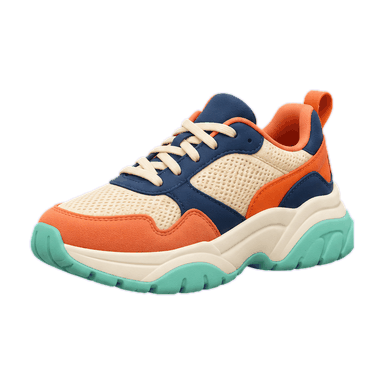
Product sticker · gentle tilt loop · solid backdrop
Shown results were exported with this tool’s Auto (color) mode. Try the original file to adjust the settings and make your own export.
- 100% free
- No sign up
- No watermark
- Color key runs locally — files never leave your device
How to remove background from GIF files
- 1
Add your GIF
Drag it in, paste from the clipboard, or pick from disk.
- 2
Pick what to remove
Auto color key removes a flat or white background across every frame. For photos and busy scenes, AI cutout supports up to 100 frames and downloads its model on first use. Use color key for longer animations.
- 3
Preview and download
Scrub the timeline, then export a transparent GIF (1-bit alpha), an APNG with soft 8-bit alpha (up to 300 frames), or a ZIP of PNG frames — with the original frame delays intact.
Every background type a GIF can have — and what removes it
| Background | Method | Difficulty |
|---|---|---|
| White / off-white | Auto color key | Easy |
| Solid brand color | Eyedropper key | Easy |
| Green screen | Chroma key + despill | Medium |
| Two-tone or gradient | AI cutout | Medium |
| Photo or busy scene | AI cutout | Hard |
| Subject with fine hair or fur | AI cutout + edge shrink | Hard |
What a GIF background remover actually has to get right
Three things decide the output.
Every frame, not just the first. A GIF is a stack of frames. Key only the first and the animation snaps back to its old background on frame two.
The timeline survives. Re-encoding must preserve each frame's delay. Get it wrong and the animation speeds up, slows down, or stops looping.
The palette does not break. GIFs share a 256-color palette across frames. Removing the background introduces transparency, which means re-indexing the palette — done carelessly, colors shift or banding appears.
No remover is perfect on every file: heavy dithering, gradients and compressed shadows all make keying harder. Expect to nudge tolerance and edge shrink on difficult frames rather than getting a flawless result from one click — and no tool can promise a fixed speed, because processing runs on your device.
Common jobs this handles
- Stickers and emotes — clean cutouts for chat, Discord and Telegram.
- Product GIFs — remove a white background for e-commerce listings.
- Green-screen clips — despill removes the green rim from hair and edges.
- Mascots and logos — flat color keying, pixel-accurate.
Free, and why
Color key processing happens in your browser, on your own device. There is no server doing that work, so there is no per-file cost to pass on — which is why there is no export limit and no watermark. Your files never leave your device.
GIF background remover FAQ
How do I remove the background from a GIF?
Drop the GIF in, let the tool auto-detect the background color, and download the transparent result. Flat backgrounds are keyed automatically; complex scenes use an AI cutout.
Can I use this as a transparent GIF maker?
Yes, if you already have an animated GIF. Removing its background makes that GIF transparent while keeping its frames. If you are starting with an MP4, WebM or still image, use the video and image converter linked below instead.
How do I make a GIF transparent without losing the subject?
Start with the detected background color, then adjust tolerance while checking the full loop. Similar foreground and background colors can remove parts of the subject; try AI cutout for those files, within its 100-frame limit. Check the downloaded result on both light and dark backgrounds.
Is this GIF bg remover free?
Yes, with no export limit and no account.
Does it work on animated GIFs?
Yes — every frame is processed and the original frame timing is preserved.
Can it remove a white background from a GIF?
Yes — that is the default auto-detect case.
What is the maximum file size?
50 MB and 1,000 frames per file.
Do I need to install anything?
No. Color key runs entirely in the browser. The AI cutout uses a model that runs locally on your device; the first use downloads it, and your browser may keep it cached so later uses start faster.
More GIF tools
- Remove Background from GIFUpload an animated GIF, strip its background frame by frame, and download a transparent version — no sign up, no watermark.
- Transparent GIF Maker from Video or ImagesConvert an MP4 or WebM clip into a transparent animation, or save a PNG, JPEG or WebP image as a single-frame GIF. Choose your frame rate, remove the background and export — free, in your browser.
- Why Does My Transparent GIF Have a White Background?A white background or a halo on your transparent GIF has a small number of specific causes, and each has its own fix. Diagnose which one you have first — then apply the matching fix below.